
Shortcodes let you embed job listings anywhere on your site, without coding. They enhance flexibility, save time, ensure consistent formatting, and allow effortless customization. If you prefer a visual, no-shortcode workflow, see Gutenberg Blocks for the block equivalent of each shortcode.
Shortcode – Job Search Form
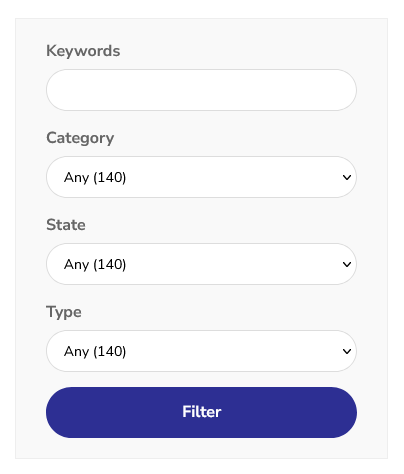
Use the [loxo-jobs-filter] shortcode to display a job search form. Visitors can filter jobs by category, location, types and keywords.
Say your job archive/listing page is at /jobs, and you want to show the filters on the homepage. Use the form_action parameter to link the form with the jobs: [loxo-jobs-filter form_action="/jobs"]
Shortcode – Job Directory
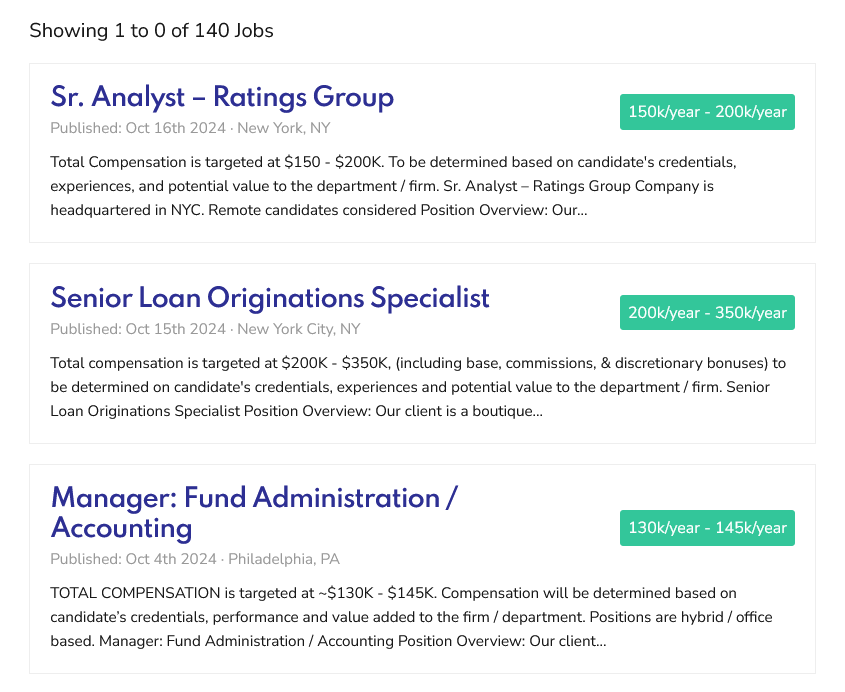
Use the [loxo-jobs] shortcode to display a job directory. To show a limited number of jobs (especially on the homepage), use the [loxo-jobs per_page=5 pagination="" show_count=""] shortcode.
Available Parameters
The following parameters work with both [loxo-jobs-filter] and [loxo-jobs]. They override the defaults configured in Template Customization.
Filtering
job_keyword— Pre-fill keyword searchjob_category— Filter by job category slugjob_type— Filter by job type slugjob_country— Filter by country slugjob_state— Filter by state slugjob_city— Filter by city slugjob_location_type— Filter by location type slug (e.g., remote, onsite)
Display
per_page— Number of jobs per page (default: from plugin settings)pagination— Pagination style:defaultormore(Load More button)show_count— Show total job count:1to show,0to hidehide_excerpt— Hide job excerpts:trueorfalsehide_salary— Hide salary:trueorfalsejob_filters— Comma-separated list of filters to show. Options:keyword,category,country,state,city,type,location_type
Filter Form Only
form_action— URL where the filter form submits to. Use when the filter and job list are on different pages.
Examples
Show 5 remote jobs with keyword and type filters:
[loxo-jobs-filter job_location_type="remote" job_filters="keyword,type"]
[loxo-jobs job_location_type="remote" per_page="5" hide_excerpt="true"]
Show all full-time jobs with Load More pagination:
[loxo-jobs job_type="full-time" pagination="more" per_page="10"]Single Job Shortcodes
These shortcodes display individual job components. The id parameter is the job’s WordPress post ID (shown in the URL when editing the job in wp-admin — not the Loxo job ID). When used on a single job page, you can omit id — the plugin uses the current job automatically.
[loxo-job-title id=123]— Display job title[loxo-job-description id=123]— Display job description[loxo-job-meta id=123]— Display job metadata (salary, type, location)[loxo-job-sharing id=123]— Display social sharing links[loxo-job-application-form id=123]— Display application form[loxo-job-company id=123]— Display the job’s company logo and name (v2.3.0+; acceptsshow_logoandshow_name, both defaultyes) — see Job Company Information
Related documentation
- Gutenberg Blocks — build the same displays visually instead of with shortcode syntax.
- Template Customization — see the underlying settings these shortcode parameters override.
- Available Job Data — check which fields are available to filter and display.
- Job Company Information — show each job’s own hiring company instead of the site-wide one.