
Knowing which roles get looked at — and which sit untouched — tells you where to put your effort. The plugin can count views on each job page and show the totals in the admin job list, without cookies, without an analytics account, and without collecting anything about the visitor.
Turn it on
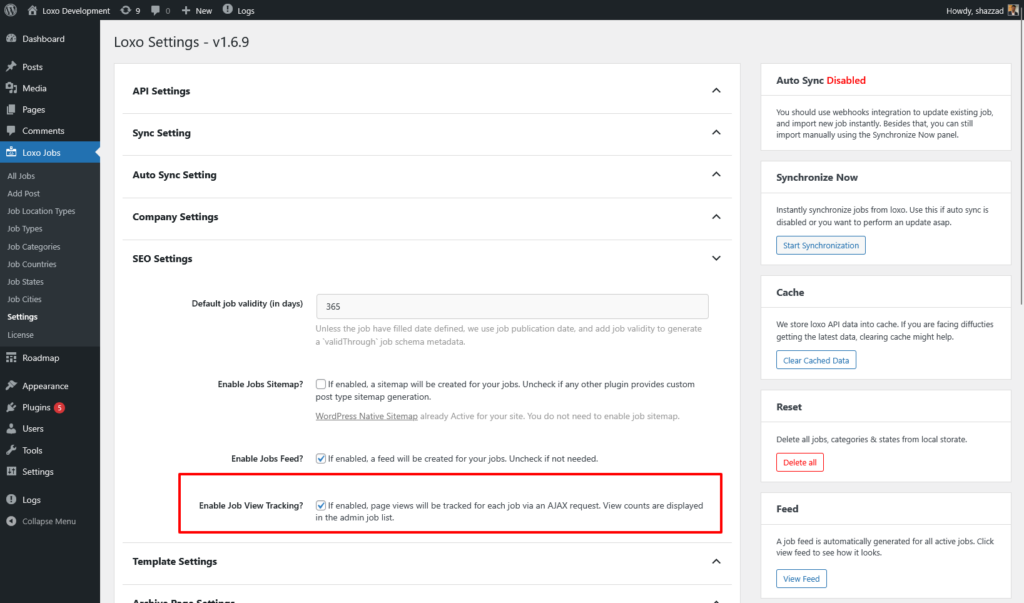
Go to Loxo Jobs → Settings and find Enable Job View Tracking? in the SEO Settings section (see Plugin Settings for the complete settings reference). Tick it and save.
The box is unticked on a new install, and nothing is counted until you tick it and save. If your Views column has been sitting at zero, this is almost always why.
How a view gets counted
When a visitor opens a single job page, a small script checks the browser’s localStorage for a flag naming that job. If there is no flag, it sends one background request to the plugin’s job-view REST endpoint, which increments a counter stored on the job, and then writes the flag. If the flag is already there, nothing is sent.
Doing the count over a background request rather than in PHP is what lets it keep working on a cached site. A cached job page is served as a static file and never reaches WordPress — so a PHP-side counter would simply stop incrementing. The request happens after the page loads, so it goes out whether the HTML came from your cache, a CDN, or WordPress itself.
There is a limit to that, and it is worth knowing before you set a long cache lifetime. The request carries a WordPress security token that is generated when the page is built and stored in the cached HTML along with everything else. That token is valid for about a day. Once the copy in your cache is older than that, WordPress refuses the request with a 403 before the plugin sees it, and counting quietly stops.
Exclude single job pages from your page cache, or keep their cache lifetime under 12 hours. This is the same precaution the job application form needs, for the same reason, so a cache rule that covers one covers the other.
The script needs jQuery, which the plugin loads as a dependency of its front-end script. On a theme that strips jQuery, or on any page with a JavaScript error before this point, no request goes out.
What is stored — and what is not
On your server the plugin stores one thing per job: an integer. There is no visitor table, no log, no timestamp.
- No cookies. The de-duplication flag is a
localStoragekey, which is not transmitted anywhere — it never leaves the browser and never appears in a request header. - No IP addresses, no user agents, no user IDs. The endpoint reads the job ID from the request and nothing else.
- No third party. The request goes to your own site’s REST API. Nothing is sent to Loxo or to us.
In practice this means view tracking collects no personal data, so it does not need a consent banner under GDPR the way an analytics tag does. If your site has a cookie policy, view tracking adds nothing to it.
If a browser blocks localStorage — private browsing modes often do — the script skips tracking entirely rather than counting every page load. It fails quiet, not loud.
Reading the numbers
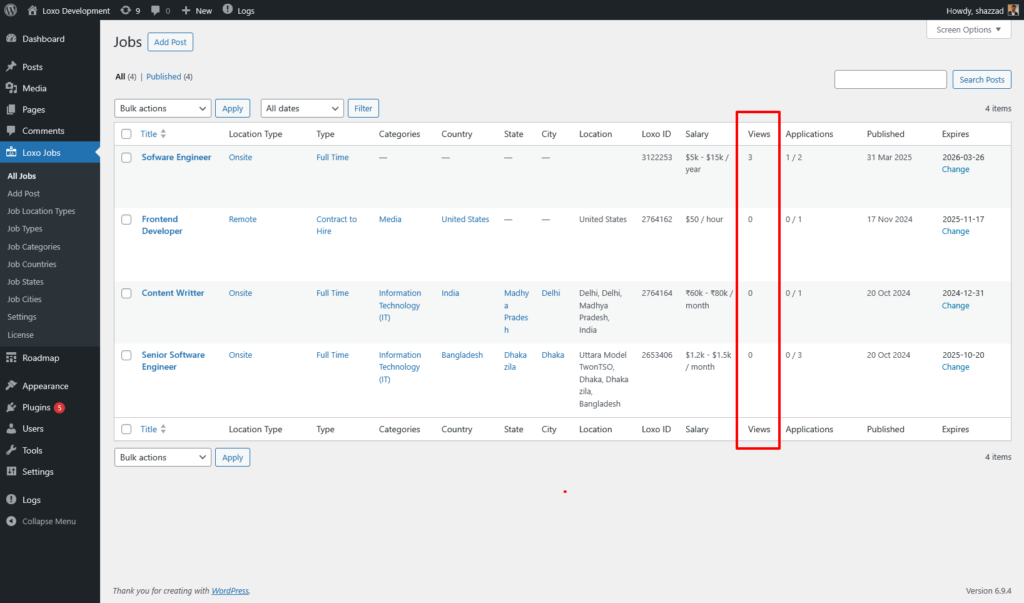
Go to Loxo Jobs. The Views column shows the running total for each job. Next to it, Applications shows on-site applications and total applications from Loxo, so the two columns together give you a rough view-to-application ratio.
Be clear about what the number is. It counts browsers that have not seen this job before, not people and not page loads:
- The same person on a phone and a laptop counts twice.
- Someone who clears their browser data counts again.
- Reloading or coming back later does not add anything — the flag has no expiry, so one browser counts once per job, permanently.
- Logged-in staff opening a job are counted like anyone else. There is no exclusion for administrators.
- Bots that execute JavaScript are counted too. Treat the totals as a comparison between jobs, not as an audited figure.
Resetting counts
There is no reset button in the admin. The count lives in a post meta field called _loxo_site_view_count, and clearing it means deleting that meta, for example with WP-CLI:
wp post meta delete <post_id> _loxo_site_view_countDeleting a job removes its count with it, so re-importing a job starts it from zero.
The endpoint
Views are recorded by a single public route, POST /wp-json/loxo/v1/job-view, taking the WordPress post ID of the job as id. The route itself is deliberately unauthenticated, so it works for logged-out visitors. The plugin’s own script still attaches a WordPress security token to the request, which is why the age of your page cache matters — see above. The endpoint refuses anything that is not a job, and returns 403 while view tracking is switched off.
Being public also means it is not tamper-proof: anyone who knows the URL can inflate a count. That is the trade-off for cache safety, and it is why these numbers are a signal rather than a metric. Full details are in the REST API reference.
Troubleshooting
| Symptom | Cause | Fix |
|---|---|---|
| Views column shows 0 for every job | Enable Job View Tracking? is unticked — its state on a new install | Tick it under Loxo Jobs → Settings → SEO Settings and save |
| Still 0 after enabling | The front-end script is not running — usually jQuery missing or a JavaScript error earlier on the page | Open a job page, check the browser console for errors, and confirm a job-view request appears in the network tab. If it appears but comes back 403, see the two rows below |
| Counts rise far slower than your analytics sessions | Expected: one count per browser per job, forever, versus one session per visit | Compare jobs against each other rather than against analytics totals |
A job-view request returns 403 | Tracking is disabled server-side | Enable the setting and save; the endpoint refuses requests while it is off |
A job-view request returns 403 with the setting already enabled | The page came from a cache older than about 24 hours, so the security token in its HTML has expired | Exclude single job pages from your page cache, or keep their cache lifetime under 12 hours |
| Your own visits are inflating a job | There is no administrator exclusion | Nothing to configure — reset the count afterwards if it matters |
FAQ
Does this work with a caching plugin or a CDN?
Yes, with one condition on the cache lifetime. The count is made by a request from the browser after the page has loaded, so it does not matter where the HTML came from — but that request carries a security token baked into the cached page, and the token lasts about a day. Keep the cache lifetime on single job pages under 12 hours, or exclude them from the cache, and counting keeps working.
Do I need to mention view tracking in my privacy policy?
There is no personal data to declare — no cookie, no IP address, no identifier of any kind is stored. Your own legal advice takes precedence, but there is nothing here to disclose.
Can I see views over time, or per week?
No. The plugin keeps a single running total per job with no dates attached, so there is no history to chart. For trends over time, use an analytics tool alongside it.
What happens to counts if I turn tracking off?
Existing totals are kept and stay visible in the Views column. They simply stop rising.
Related documentation
- REST API — call the
job-viewendpoint directly, e.g. from a custom front end. - Plugin Settings — full reference for the settings screen where view tracking is enabled.
- Job Application Form — where the Applications column beside Views comes from.