
Plugin features
Features
Google Indexing API [NEW]
Ping Google’s Indexing API automatically whenever a job is published, updated, or removed — the method Google recommends for job postings — so listings get crawled faster.
Site Application Tracking [NEW]
Track how many candidates apply for each job through your website. View application counts per job in the admin dashboard for clear hiring insights.
Job View Tracking [NEW]
Track unique page views for each job listing. Cache-safe AJAX tracking with duplicate prevention gives you clear visibility into which jobs attract the most interest.
SPAM Protection
Protect your application forms with Google reCAPTCHA v3. Score-based validation blocks spam submissions without making real applicants solve a puzzle.
Job Expiration Management
Control how long job listings stay active. Set a default validity period or override per job. Expiration dates feed directly into the JobPosting schema for accurate Google for Jobs listings.
Webhook Integration
When a job is created, updated, or deleted in Loxo, a webhook listener brings the change to your website instantly — no waiting for the next sync.
Job Directory
Display all your jobs in a searchable directory, each with a short preview of the description and salary. Visitors can filter by category, type, country, state, city, and keyword.
Job Sync
Periodically fetch jobs from Loxo and store them in your WordPress site. Serving jobs locally makes pages load faster and improves SEO.
Job Details Page
The job details page works like any WordPress post or page, showing the full job description, its metadata, and the application form.
Application Submission
Applicants can apply for a job directly from the details page. On successful submission, they see a clear thank-you message.
Job Sharing
Visitors can share a job with friends or a matching candidate using the built-in share buttons.
Job Schema
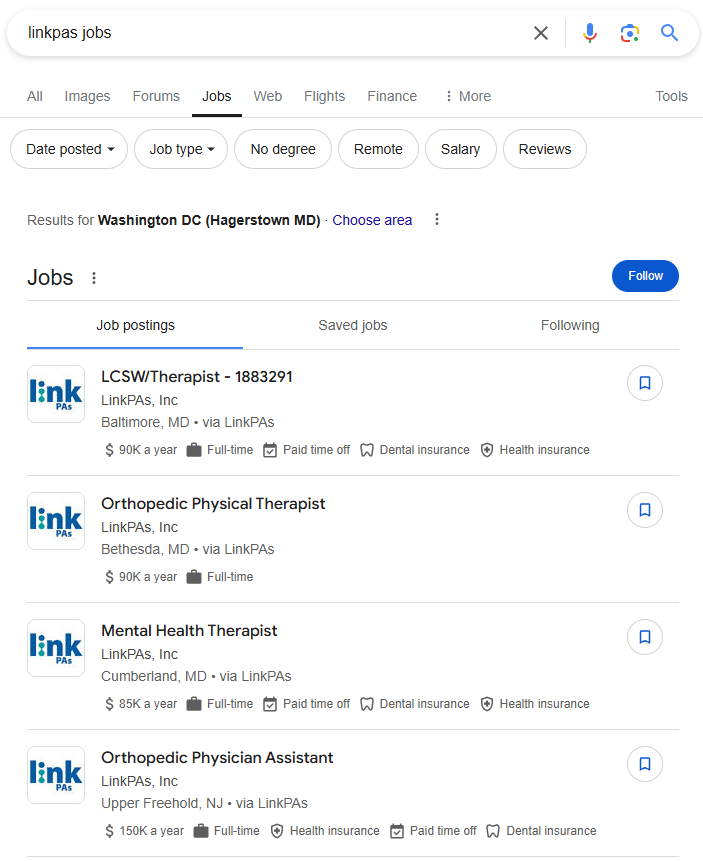
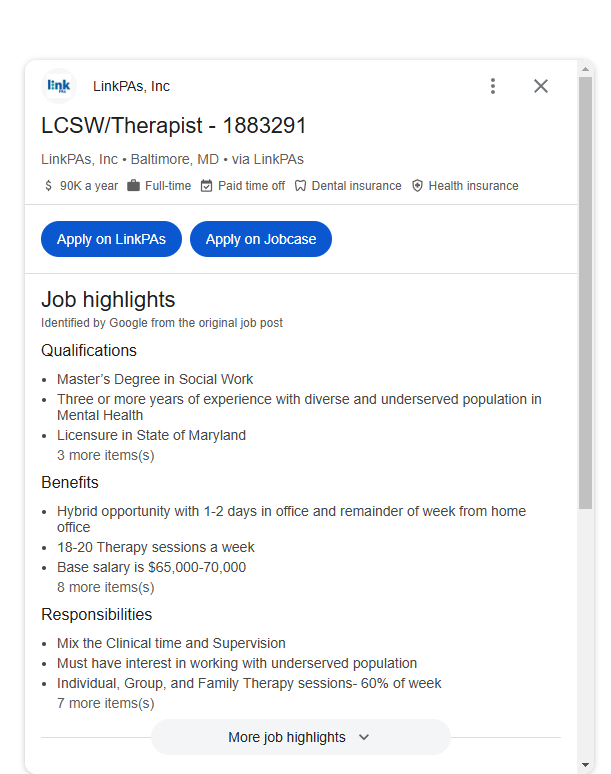
For every job, Loxo outputs valid JobPosting structured data that search engines understand. Once Google verifies it, your listings can appear in the Google for Jobs search experience.
Job Company Display [NEW]
Show each job’s own hiring company — name, logo and website imported from Loxo — on job pages and in the job schema, with automatic fallback to your agency brand when a client is hidden.
Block Theme Support [NEW]
Works out of the box with block themes: ready-made Site Editor templates for the job details page and jobs archive, a Jobs Archive pattern, and drag-and-drop job blocks. Your own template customizations always take priority.
Job Sitemap
Search engines need a sitemap to discover new jobs and crawl them. Loxo generates a job XML sitemap out of the box — now with last-modified dates so changes are picked up sooner.
Avada Compatible
Build your job details and directory pages with the Avada theme builder. Job layouts appear automatically in Avada templates — design your layout and drop in the matching shortcode.
Get found on Google faster
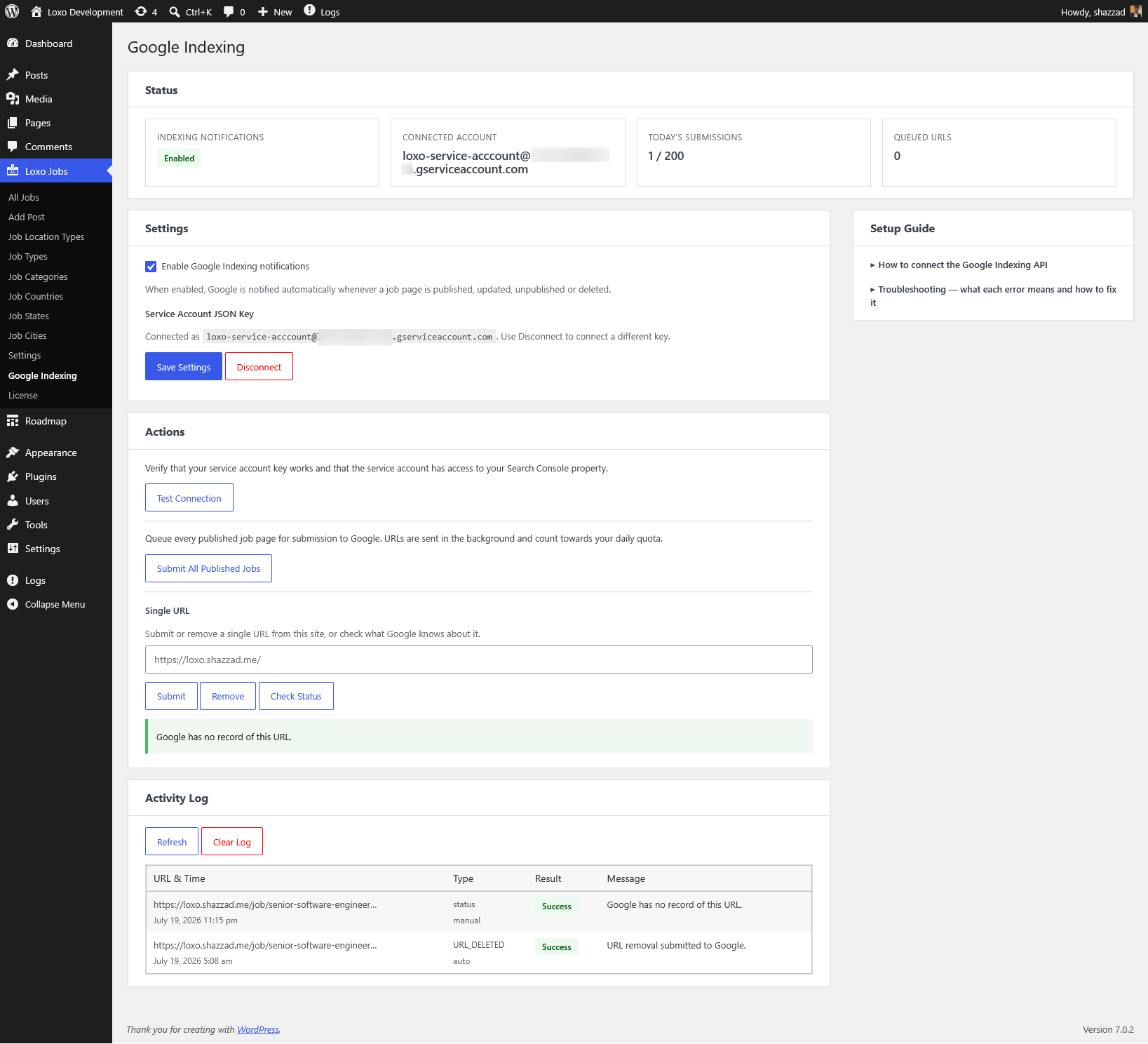
Google Indexing API
Tell Google the moment a job changes, so your listings are crawled in hours — not days.
Google recommends the Indexing API over sitemaps for time-sensitive content like job postings, because ordinary crawling is too slow and unreliable at volume. Loxo connects your job pages straight to it.
When a job is published, updated, or removed, Loxo notifies Google automatically so the page is crawled quickly. You connect your own Google service account, so every submission and your daily quota stay entirely yours.
- Automatic notifications when jobs are published, updated, or removed
- One-click “Submit all jobs”, plus manual submit, remove, and status checks for any URL
- Daily quota tracking, a one-click connection test, and an activity log of every submission
- Uses your own Google service account — no shared limits
Tip: pair it with the free Auto-Extend Expiry add-on to keep each job’s validThrough date rolling forward automatically, so the pages Google indexes always look currently open.
Know what’s working
Application and View Tracking
See which jobs get noticed and which convert — right inside your WordPress dashboard.
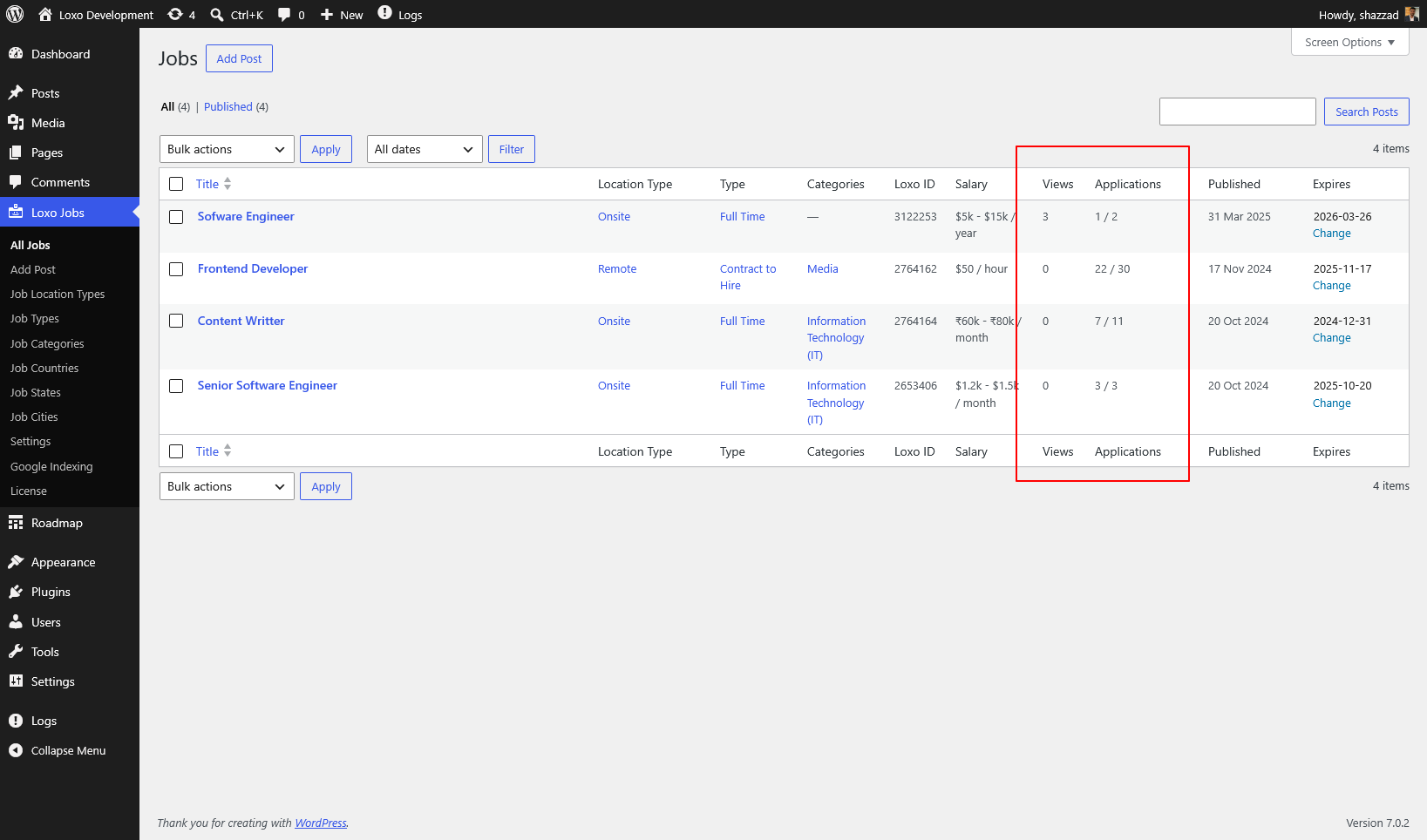
Every job listing tracks two numbers that matter: how many people viewed it, and how many applied. Both appear as columns in the admin job list, so your best-performing roles stand out at a glance.
- Job view tracking — counts unique page views per listing using cache-safe AJAX with duplicate prevention, so the numbers stay accurate even behind page caching. Turn it on or off under SEO Settings.
- Application tracking — shows how many candidates applied through your website, alongside the total pulled from Loxo, with onsite and total counts side by side.
- At a glance — Views and Applications appear as sortable columns right in the admin job list.
Customer Reviews
Testimonials
Dave Morley
The Loxo WordPress Plugin was a very quick and effective solution for our Job Board. We had long been struggling with a different provider whose setup was complex and routinely crashed. Setting up the Loxo WordPress Plugin was fast, done in about a day and the support was excellent. Our new job board works well, we are getting more applications than before and the easy customization meant that it came out looking exactly like we wanted.
★★★★★
Better Google Job Search
Job schema
Straightforward
Pricing
14-day money-back guarantee on every plan.
Single
$69
/year
Single site
1 year of updates & support
Keeps working after that
Every feature included
Multiple
$159
/year
5 sites
1 year of updates & support
Keeps working after that
Every feature included
Designed for Efficiency & Flexibility
Empower your recruiting team by automating job postings with Loxo’s API, while ensuring your WordPress site is always up to date. Whether you’re a small business or a large agency, the plugin scales to meet your needs. Ready to streamline recruitment? Get started today!