
Overview
Auto-Extend Expiry is an add-on for the Loxo plugin. It automatically rolls the expiration date of your active job postings forward, so the validThrough value in each job’s JobPosting structured data stays realistic and near-term. Google reads an unrealistically distant validThrough as a sign that a listing is no longer a currently-open role, which can hurt indexing — this add-on keeps that date fresh for you, with no manual editing.
This only affects the search-engine expiration date. It never changes which jobs appear on your site — that is controlled by each job’s status in Loxo.
Requirements
- The Loxo plugin version 1.9.0 or newer, installed and active.
Installation
- Download the Loxo Auto-Extend add-on ZIP.
- In WordPress, go to Plugins → Add New → Upload Plugin, choose the ZIP, and install it.
- Activate the plugin. Its screen appears under Jobs → Auto-Extend.
Settings
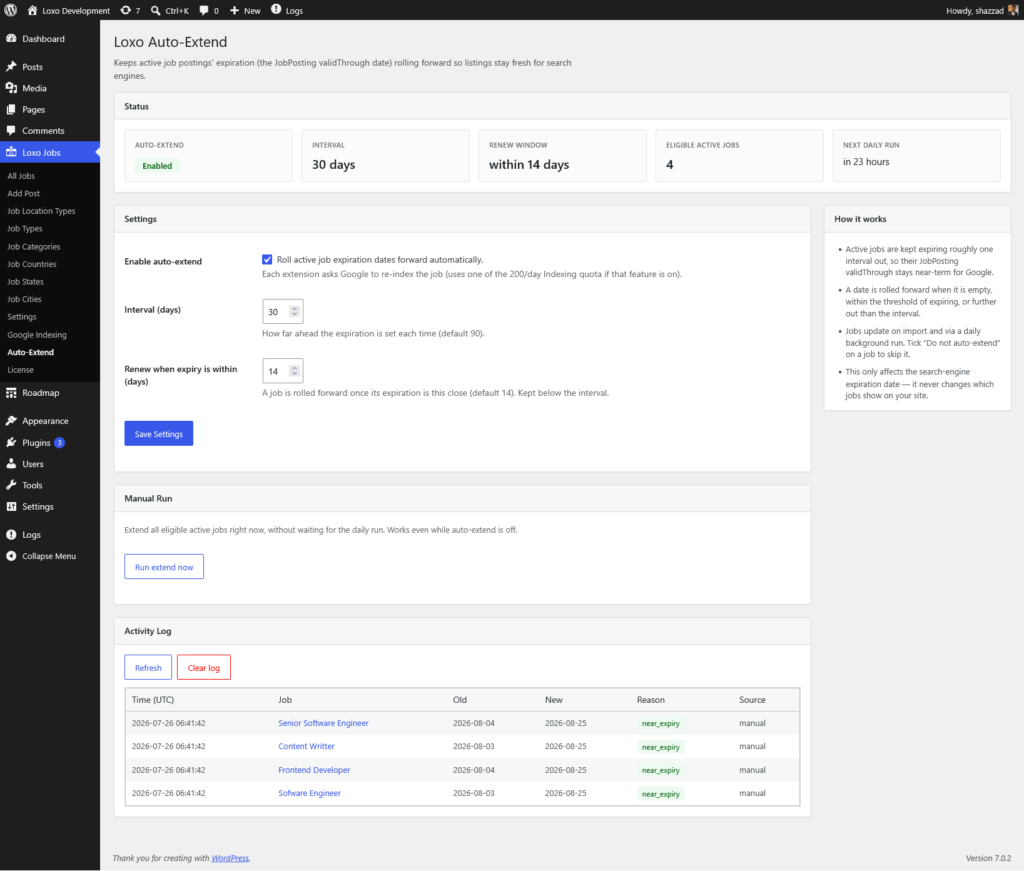
Open Jobs → Auto-Extend. A status header summarises the current state, with the settings below it.
- Enable auto-extend — turns automatic rolling on. Off by default.
- Interval (days) — how far ahead each extension sets the expiration. Default 90.
- Renew when expiry is within (days) — how close to expiry a job is rolled forward. Default 14, and always kept below the interval.
How a job is chosen
A job is extended when it is active (published) in Loxo, its publish-start date has passed, and it is not individually excluded. Its expiration is then rolled forward when the stored date is empty, within the renew window, or further out than the interval — otherwise it is left unchanged, so unchanged jobs are never re-pinged.
When it runs
- On import — every time a job syncs from Loxo, its date is checked and rolled forward if due.
- Daily background task — a safety net that catches jobs quietly approaching expiry.
- Run now — the Run extend now button processes all eligible jobs immediately, even while auto-extend is switched off.
Excluding a job
To keep the add-on from touching a specific job, open the job editor and tick Do not auto-extend in the Auto-Extend box.
Activity log
Every change is recorded in the Activity Log on the Auto-Extend page — the job, the old and new dates, why it was rolled forward, and whether it came from an import, the daily run, or a manual run. Use Refresh to reload it and Clear log to empty it.
Google indexing
Each extension is a genuine change to the job, so if the Google Indexing API feature is active, the job is automatically re-submitted to Google. On first enable, a backlog of far-out jobs is normalised over the following days, within Google’s daily submission quota.
Related documentation
- Job Schema and SEO — see how the validThrough date this add-on maintains feeds into each job’s structured data.