Overview
The Loxo plugin includes a built-in job application form that allows visitors to apply for jobs directly from your WordPress site. Applications are submitted to the Loxo platform via API.
Form Fields
The application form collects the following information:
- Name — Applicant’s full name (required)
- Email — Applicant’s email address (required)
- Phone — Applicant’s phone number (required)
- Resume — File upload for resume/CV (required)
- Consent checkbox — Optional, configurable in settings
Displaying the Form
The form can be displayed using either:
- Shortcode:
- Gutenberg Block: Job Application Form (under the Loxo category)
On the default single job page template, the application form is automatically displayed below the job description.
How Submissions Work
- Visitor fills out the form and clicks Apply.
- The plugin validates the submission (nonce check, required fields, reCAPTCHA if enabled, consent if enabled).
- The application data (name, email, phone, resume file) is sent to the Loxo API.
- On success, the visitor sees a confirmation message: “Congratulations!!! You have successfully applied for this job.”
- On failure, the visitor sees the specific error message and can resubmit.
Applications are stored in your Loxo account and can be managed from the Loxo dashboard.
Consent Checkbox
To add a consent/terms checkbox to the form, go to Loxo Jobs → Settings under the Job Application section:
- Enable Consent — Check to show the consent checkbox on the form.
- Consent Text — The label shown next to the checkbox (e.g., “I agree to the terms and conditions”).
- Consent Description — Optional additional text displayed below the checkbox.
When enabled, applicants must check the consent box before submitting their application.
Spam Protection
The application form supports Google reCAPTCHA v3 for spam protection. See the Google reCAPTCHA v3 documentation page for setup instructions.
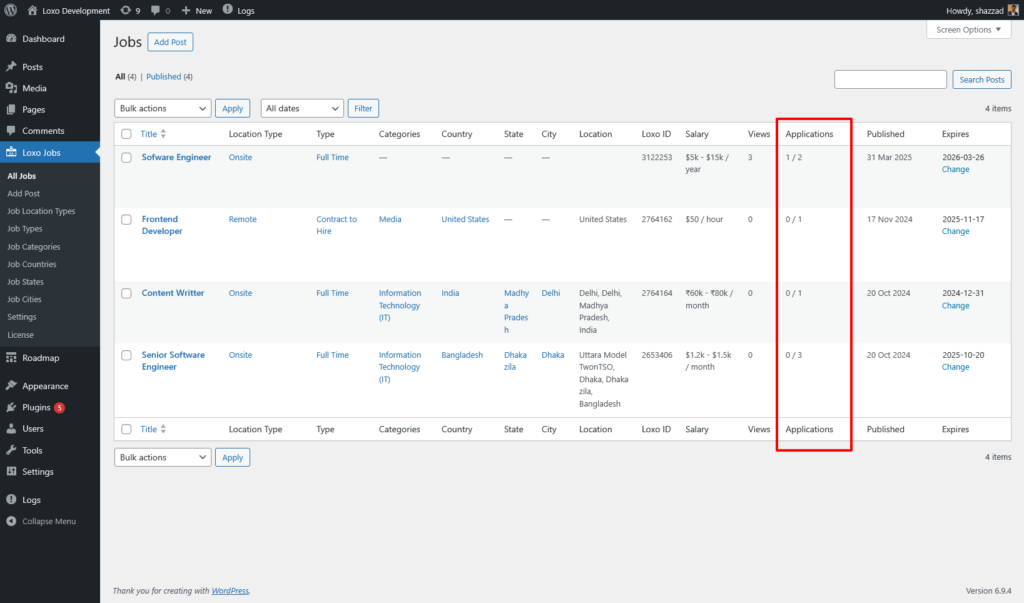
Application Tracking
The plugin tracks job applications from two sources:
- Onsite — Applications submitted through your website’s job application form. Counted locally by the plugin.
- Total — All applications across all channels (your site, direct via Loxo, third-party platforms). Synced from the Loxo API during job synchronization.
Both counts are displayed in the Applications column on the admin Jobs list in the format onsite / total. Hover over each number to see which is which.